home
home
 projects
 about
about
 contact
 follow
 feed
feed
 settings

Categories
Sponsors

Archive
 Blogroll
Badges

Community

|

SCVMM 2008 R2 – Solution of Warning (13921)
Posted in Virtual Machine Manager | 2 Comments | 13,054 views | 23/11/2009 14:39
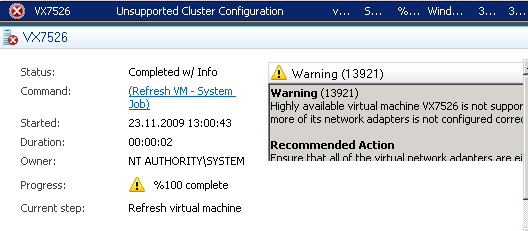
You may get warning (13921) after migration of a virtual machine from a host to cluster: Warning (13921)
Highly available virtual machine VX7526 is not supported by VMM because one or more of its network adapters is not configured correctly. Recommended Action
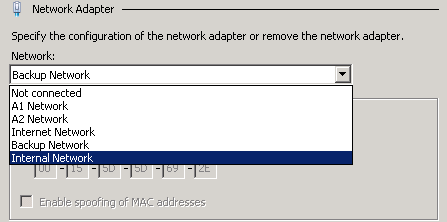
Let’s check virtual network adapters of the virtual machine:
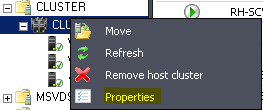
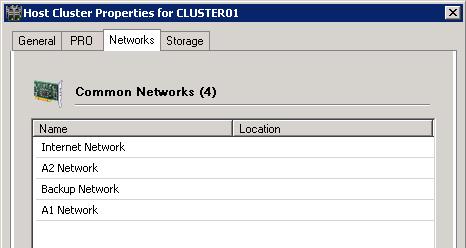
As you see, I have 5 network tags. But the “Internal Network” exist in the Cluster? Let’s check it. Right click to Cluster and click to Properties. Click “Networks” tab.
Now I see only 4 network cards. So where is the “Internal Network”?
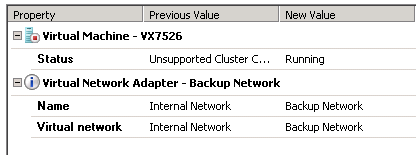
That means I don’t have any network called “Internal Network”. So I have to create Internal Network in all Clustered Hosts or I have to choose another network. I simply choose Backup Network for my virtual machine.
Tadaaaa! We fixed it :) Remember, in order to assign a virtual network to virtual machine in a cluster environment, you need to create that virtual network in all hyper-v hosts. Good luck.
Tags: hyper-v cluster virtual networks, scvmm 2008 R2, scvmm cluster network adapters, scvmm warning 13921
Comments (2)
Leave a Reply
|